
NYSC
How to Check NYSC Senate List Portal 2026
How to Check NYSC Senate List Portal 2026: You just finished your final exams, defended your project, and celebrated your graduation. You’re ready for NYSC camp.
But here’s the harsh truth: NYSC doesn’t know you exist until your school officially tells them.
That official introduction is the NYSC Senate List.
I’ve seen too many prospective corps members panic on registration day. Their mates are done with their online registration, while they are stuck staring at a frustrating “No Record Found” error on the NYSC portal.
Why does this happen?
Because a lot of graduates assume mobilization is automatic. It’s not. If your name is not on that Senate list, you cannot register for NYSC, no matter how ready you are.
The Senate list is simply the approved graduation list your university or polytechnic sends to NYSC headquarters. As far as NYSC is concerned, that list confirms that you have graduated and have been cleared by your school for mobilization.
Instead of waiting until the registration portal opens before finding out there is a problem, check your status early.
In this guide, I’ll show you how to check the NYSC Senate List and what to do if your name is missing.
What Is the NYSC Senate List?
If you have been hearing people talk about the NYSC Senate List and you are not exactly sure what it means, do not worry. Many graduates get confused about it too.
In simple terms, the Senate List is the list your school sends to NYSC to confirm that you have graduated and are eligible for mobilization.
Think of it this way. Graduating from school alone is not enough for NYSC. Your institution must officially submit your details and confirm that you have met the requirements for service. That confirmation is what puts your name on the Senate List.
This is where many prospective corps members get it wrong. They assume that once their final results are out, they are automatically ready for NYSC. Unfortunately, it does not work that way.
I have seen graduates who were already preparing for registration only to discover that their names were not on the Senate List. At that point, NYSC registration becomes impossible until the issue is resolved.
That is why checking your Senate List status should be one of the first things you do once mobilization activities begin.
Are You Eligible to Be on the Senate List?
Not every graduate appears on the Senate List immediately.
Before your school can submit your name, certain things must already be in order.
First, your school clearance should be complete. If there are unresolved issues with your department, faculty, library, or student affairs unit, your mobilization may be delayed.
You should also make sure your JAMB records are correct. This is especially important for graduates who had admission issues or have done JAMB regularization at some point.
Age limit. Although this does not stop your name from appearing on the senate list. It is worth noting that if you were above the approved age limit which is 30 at the time of graduation, you will most likely receive an exemption certificate instead of being mobilized for service.
One thing I usually tell graduates is not to assume everything is fine simply because they have finished school. It is always better to confirm early than to discover a problem when registration is already ongoing.
Who Submits the NYSC Senate List?
Many people blame NYSC whenever their names do not appear on the portal, but in most cases the delay starts from the school.
The Senate List is compiled and submitted by your institution, not NYSC.
After the necessary approvals are completed, the school’s mobilization officer uploads the details to the NYSC portal.
This is why your school should be your first point of contact if your name is missing.
Instead of spending days refreshing the NYSC portal, visit your Student Affairs Division or Mobilization Office and ask questions. In many cases, they can tell you exactly what is causing the delay.
That simple step can save you a lot of unnecessary stress.
Requirements to Check NYSC Senate List Portal 2026
You must have the required and correct details before you can check your name on the NYSC senate list. These are:
- Your matriculation number
- The Institution you graduated from
- Your surname (exactly as it appears in your school records)
- Your date of birth
How to Check the NYSC Senate List Online
It is very easy, simple and straightforward to check your name on the NYSC senate list portal. You can do it from your phone or laptop at home.
Here is how to go about it step by step:
- Open your browser and visit the official NYSC Senate List portal at https://portal.nysc.org.ng/nysc1/VerifySenateLists.aspxhttps://portal.nysc.org.ng/nysc1/VerifySenateLists.aspx
- Select your institution from the dropdown menu and enter your matriculation number carefully. Make sure you don’t mix it up with any other number because even a small mistake will return an error.
- Fill in other required details like your surname and date of birth. This must match exactly what your school has on record.
- Click the search button to continue.
- If your name has been uploaded, your details will show immediately on the screen.
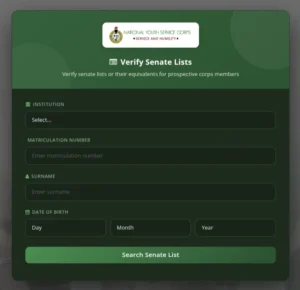
If it says “No Record Found,” don’t panic immediately. First, double-check your details to make sure there’s no typing error. If everything is correct and it still doesn’t show, it usually means your school has not uploaded the list yet or your details are still being processed.
What If It Says “No Record Found”?
If you get a “No Record Found” message, do not immediately assume something is wrong.
Start with the obvious. Double-check your matriculation number, surname, and date of birth. A small mistake can prevent your details from showing up.
Also, remember that schools do not always upload names at the same time. I have seen situations where some students in the same department could find their names while others had to wait a few more days before theirs appeared.
So if registration is still some time away, give it a little time and check again later.
That said, if NYSC registration has already started and your name is still nowhere to be found, it is time to contact your school’s mobilization officer or Student Affairs Division. At that point, repeatedly refreshing the portal will not give you any new answers.
What to Do If Your Name Is Not on the NYSC Senate List
It is frustrating seeing your coursemates complete their registration while your own name is missing from the Senate List.
The first thing to understand is that NYSC registration cannot happen until your name appears on the list. There is no shortcut around it.
Over the years, I have noticed that many graduates immediately assume the worst. In reality, the issue is often something simple that can be resolved once you identify the cause.
Why Your Name Might Be Missing
In most cases, one of the following is responsible:
- Your school has not uploaded the approved Senate List yet.
- You still have outstanding clearance issues.
- There are unresolved academic records or results.
- Some of your details do not match the records submitted by your school.
- Your institution missed the upload deadline for the current batch.
The most common reason is usually the first one.
Many graduates spend days worrying about their mobilization status when their school simply has not completed the upload process yet. That is why your first step should always be to confirm the situation with your school before jumping to conclusions.
What to Do If Your Name Is Not on the NYSC Mobilization List
If your name is missing from the mobilization list, your school should be your first stop.
One mistake many graduates make is relying entirely on information from WhatsApp groups. While those groups can be useful, they are also where half-true information spreads the fastest.
Instead, visit your Student Affairs Division or speak with the mobilization officer. Ask whether your name was included in the last submission and if another upload is expected.
If there are unresolved issues attached to your record, deal with them immediately. Outstanding clearance, missing results, or unpaid fees can all delay mobilization.
Also take a few minutes to verify your details. Something as small as a misspelled surname or incorrect date of birth can create problems later.
In some cases, there is actually nothing wrong. Schools do not always upload every name at once. I have seen graduates panic over a missing name only for it to appear a few days later after another batch was uploaded.
That is why it is important to confirm the facts before assuming the worst.
How Long Does It Take?
This is probably one of the most common questions graduates ask, and unfortunately there is no single answer.
The process depends heavily on your institution.
After departments submit their records, the list still has to pass through approvals before it eventually gets uploaded to the NYSC portal. In some schools, that process moves quickly. In others, it can take much longer than students expect.
From what I have observed, delays are often administrative rather than personal. A meeting gets postponed, documents are still being reviewed, or the school is working through a backlog from previous batches.
That is why two graduates from different institutions can finish school at the same time but get mobilized months apart.
The waiting can be frustrating, but the best thing you can do is stay informed and follow up when necessary.
How to Keep Track of Updates
Your departmental and faculty WhatsApp groups are usually the first places where updates start circulating. Just make sure you verify any information before acting on it.
It is also worth checking the Senate List portal from time to time, especially when your school confirms that submissions have been made.
One thing I have noticed over the years is that many graduates immediately assume there is a serious problem when they do not see their names. More often than not, the upload simply has not happened yet.
And even if a delay causes you to miss the current batch, that does not mean your NYSC journey is over. It is disappointing, no doubt, but many corps members have been in the same position and eventually got mobilized in the next stream.
For now, stay in touch with your school, keep an eye on updates, and make sure there are no unresolved issues on your record.
Common NYSC Senate List Errors and How to Fix Them
If after you check your name and you find it on the NYSC senate approved list, but don’t close the page immediately. Take a few extra minutes to verify that every detail on it is correct. Errors on the senate list are more common than most people realize, and the last thing you want is to discover a mistake when you are already at the portal trying to register.
Here are the most common errors and exactly what to do about each one.
Name Spelling Errors
This one causes a lot of panic, and understandably so. Just go to your student affairs office and report it. They will make the correction, but here is what most people do not tell you: the correction will only reflect on the NYSC portal when your school does their next upload. Your school cannot push a single name correction in isolation. It goes out with the next batch submission.
If you can’t wait for school to make the corrections, another option is complete your NYSC online registration, after submission, log in to your NYSC dashboard portal and apply or arrangements of name.
Also, your school will only correct your name to match what is already on their official record. If your name on their system is different from what you use elsewhere, that conversation needs to happen with them first.
Wrong Course of Study
This one is actually easier to fix than most people expect. If your course of study appears differently from what you studied, you do not have to wait for your school to resubmit anything.
After your online registration, apply for a course correction directly from your NYSC dashboard and then wait for the NYSC to approve the changes. The correction usually reflects within a few days to reflect.
Wrong Date of Graduation
This is the most serious error on the list and the one you absolutely cannot ignore. The date of graduation on the senate list must match exactly what is on your statement of result or certificate. If there is any difference, NYSC will flag your record and you could be sent back from camp. That is not an exaggeration. It has happened to people.
The moment you spot this error, go to your Student Affairs Officer immediately with your original documents. They will either correct the senate list entry for the next upload or, in very rare situations, issue a corrected statement of result. Make sure the corrected date reflects on the senate list before the next mobilization exercise so you can proceed without issues.
General Rule for Any Senate List Error
For any correction that involves your school resubmitting data to NYSC, the process is the same:
- Visit the mobilization or student affairs office in person
- Submit a written complaint and attach clear photocopies of the correct documents.
- Follow up consistently until the correction shows on the NYSC portal
The hard truth here is that most corrections do not appear before camp opens. If you have an error in your name or date of graduation, going to camp with that mistake is a risk. In most cases, you will be turned back. The better approach is to resolve it, wait for the correction to reflect, and then proceed with the next batch rather than gambling with your time and transport money.
It is not the ideal situation, but it is far better than arriving at camp and being sent home.








How to Check JAMB Matriculation List for NYSC Mobilization 2026

All You Need to Know About NYSC PPA (2026 Guide)

NYSC POP Guide: Final Clearance Requirements, Dress Code, and Certificate Collection
NYSC POP 2026: 150+ Congratulations Messages, Prayers, and Quotes
How to Apply for NYSC Relocation Online 2026

How to Get NERD Clearance Slip for NYSC Mobilization 2026

How to Print Your NYSC Call Up Letter 2026

What is the NYSC Green Card and Everything You Need to Know About It

How to Access NYSC Portal Login Dashboard 2026
