
NYSC
What is the NYSC Green Card and Everything You Need to Know About It
Once you finish your online NYSC registration, the first document that will appear on your dashboard is the green card. It is your proof that your registration has been successfully submitted and stored in the NYSC database. Without it, your registration is not complete and you cannot move forward to the next stage of the mobilization process.
When you arrive at camp, the green card is the first document you will be asked to present, so you want to make sure you have it ready before then.
In this post, you will learn everything about the NYSC green card, what it looks like, what information it contains, how to print it out, and how it is different from the NYSC call up letter.
What is the NYSC Green Card?
When I first heard the term “green card,” my mind went straight to some kind of international passport or identity card. If you thought the same thing, do not worry, you are definitely not alone. A lot of prospective corps members (PCMs) have the same question when they first come across the term.
Here is the funny part though. The green card is not even green. It is simply a document you print out on a plain A4 paper from your NYSC dashboard. Despite how ordinary it sounds, it is one of the most important documents you will need to kick off your one year mandatory service.
Think of it as your official confirmation slip. It tells NYSC that you completed your online registration and that your details have been saved in their system.
What Does the NYSC Green Card Contain?
The green card contains all the personal details you entered while filling out your online registration form. When you print it out, here is what you will find on it:
- Your full name
- Date of birth
- Gender
- Your call up number
- Course of study and institution
- Contact address and phone number
- Next of kin information
- Blood group and genotype
- Date of graduation as provided by your school
- Kit sizes including shoes, shirts, and shorts
- Your passport photograph
It is important that you go through every detail on the green card carefully after printing it. If you notice any error or wrong information, you want to address it as early as possible before you get to camp.
How to Print the NYSC Green Card
Now that you know everything about the NYSC green card, it is time to show you how to print it out. The good news is that the process is very simple and straightforward. Just follow the steps below one after the other:
- Visit the official NYSC portal at https://portal.nysc.org.ng/nysc/
- Click on the login button
- Enter the email address and password you used during your registration
- A page will pop up showing your addendum, simply close it
- Scroll down until you see a button that says “Print Slip” and click on it
- Your green card will appear on the screen and you can either print it out directly or save it as a PDF on your device
Please note: Before you attempt to print the green card, make sure you have completed your registration on the portal, paid your registration fee through Remita, and confirmed that your payment has been approved. Your call up number should also already be visible on your dashboard. If any of these steps are missing, you will not be able to print the green card.
How Does NYSC Green Card Look Like?
Let’s clear up a funny misconception right now: the NYSC Green Card is neither green nor is it an actual plastic card.
Before my own registration, I remember searching what does nysc green card look like, fully expecting something like a driver’s license or a national ID card. It’s not.
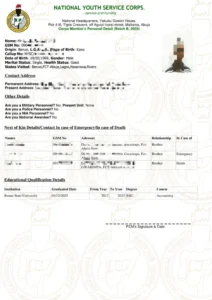
If you are wondering how does nysc green card look like before you hit print, picture a standard document printed on a plain white A4 paper. The name “Green Card” comes from the NYSC logo and green-coloured header at the top of the page, not because the document itself is green.
Right below that, you will see your passport photograph along with the details you provided during registration. This includes your call-up number, institution, blood group, kit sizes, and next-of-kin information.
At first glance, it may look like just another printed document, but don’t treat it casually. Print it in colour, keep it safe, and sign it where necessary.
Along with your Call-up Letter, this is one of the most important documents you will take to camp. Make sure you keep both documents in good condition before your reporting date.
Difference Between the NYSC Green Card and the NYSC Call Up Letter
A lot of prospective corps members confuse the green card with the call up letter. These are two completely different documents and it is important that you know the difference between them.
Here is a simple breakdown:
- The green card is the official confirmation that your NYSC registration has been completed and submitted successfully. The call up letter, on the other hand, tells you the specific state, address, and date you are expected to report at camp.
- The green card contains your personal details and registration information, while the call up letter gives you instructions on how to prepare for camp and where to go.
- The green card is the first document you will print from your dashboard and it can show up within a few days or even weeks after completing your registration. The call up letter comes much later, usually two to three days before camp opens, after NYSC releases the official posting and stream details.
So to put it simply, the green card tells you that your registration is done, while the call up letter tells you where and when to show up. You need both documents, so make sure you save and print them as soon as they become available on your dashboard.
Finding and Fixing Errors on Your NYSC Green Card
Nobody is perfect, and mistakes can happen even when you tried your best to fill everything correctly. If you print out your green card and notice any error on it, it is advisable that you address it immediately without delay. Every detail on that document follows you into camp and throughout your entire service year, so the earlier you fix any serious mistake, the smoother your NYSC journey will be.
Now, not every error on your green card requires urgent attention. Some are minor and you can let them go, while others are serious and must be corrected as soon as possible.
Minor Errors You Can Overlook
Some errors are not worth losing sleep over. For example, if your kit size or shoe size is wrong, that is not something you need to stress about. Also, if you entered the wrong date of entry or graduation for your primary or secondary school, you do not need to worry about it either. These details do not affect your service year in any way, so you can leave them as they are.
Major Errors You Must Correct
There are certain errors you must never ignore. The moment you spot any of the following, take action immediately:
- Date of Graduation
If the date of graduation on your green card does not match what is on your statement of result or certificate, you need to fix it right away. NYSC takes this very seriously and both dates must correspond with each other. If they do not match, contact your Student Affairs Officer at your institution immediately and ask them to correct it on their end.
- Course of Study
This type of error most likely came from your school, but that does not mean you should ignore it. The good news is that correcting it is very easy. Simply log in to your NYSC dashboard and update it from there without any complicated process.
- Date of Birth
You already know how important your date of birth is, so this one goes without saying. If it is wrong, NYSC gives you the option to correct it using a WAEC verification PIN, which you can access directly from your dashboard. However, this option only works for graduates who have a WAEC result. It is also worth knowi by default, NYSC pulls your date of birth from your JAMB profile, so even if you decide not to correct it, it will not stop your service going ahead. But it is always better to have accurate information on your documents.
Errors on the NYSC green card are more common than you think, and many corps members have dealt with them before. The key is to not wait until you get to camp before trying to sort things out. Handle Handle rly, give yourself peace of mind, and move into camp with confidence.
Frequently Asked Questions About the NYSC Green Card
Here are some of the most common questions prospective corps members ask about the NYSC green card. If you have been wondering about any of these, you are in the right place.
Why is my NYSC Green Card Not Showing?
This is one of the most common complaints among prospective corps members, and the good news is that it is usually something simple you can fix on your own. Here are a few things to check and try:
- First, confirm that your payment was successful. You can verify this using your registered email address.
- Make sure that your call up number is already showing on your dashboard, because without it, the green card will not appear.
- Log out of the portal and log back in after a few hours. Sometimes the system just needs a little time to update.
- Clear your browser cache and try again. This simple step fixes the problem for a lot of people.
- If you have only been checking on your phone, try switching to a laptop or desktop computer and see if it shows up there.
- You can also try using a different browser. Chrome tends to work more smoothly for NYSC portal processes, so that is a good one to start with.
- Lastly, keep in mind that the NYSC portal sometimes experiences heavy traffic, especially during mobilization periods. If everything else looks fine on your end, simply wait for a while and try again later.
If you have gone through all of these steps and your green card is still not showing, it is best to reach out to your institution or contact NYSC support directly for further assistance.
How do I get my NYSC Green Card?
Once your registration and payment are successfully completed, the green card will appear on your dashboard automatically. Simply log in to the NYSC portal, download it as a PDF, and print it out in colour.
Can I go to camp without my Green Card?
No, you cannot. The NYSC green card is compulsory for camp registration. It is the proof that you completed your online registration, and without it, camp officials will not register you. Make sure you have it printed and ready before you travel to the camp.
Is the Green Card the same as the Call Up Letter?
No, they are two different documents entirely. The green card confirms that your registration was completed successfully, while the call up letter tells you your posting state, camp address, and the date you are expected to report. Both documents are important and must be printed separately.
My Green Card is not showing after payment. What should I do?
Wait a few hours and then log out and log back in to the portal. You can also clear your browser cache, switch to a different browser, or use a laptop instead of a phone. Make sure your call up number is already showing on your dashboard before attempting any of these steps.
Can I reprint my Green Card if I lose it?
Yes, you can. The green card can be downloaded and printed as many times as you need. Simply log in to your NYSC dashboard at any time and print it out again.
Do I need to bring both the original and photocopies of the Green Card to camp?
Yes, you do. You will be required to submit photocopies during the registration process at camp, but officials will also request to see the original copy for verification. So make sure you come prepared with both.
Why is it called a Green Card when the paper is white?
That is a very common question and honestly, a fair one. The document is printed on plain white A4 paper, so there is nothing green about it. It is simply the name NYSC uses for that particular document. Do not let the name confuse you.








How to Check JAMB Matriculation List for NYSC Mobilization 2026

All You Need to Know About NYSC PPA (2026 Guide)

NYSC POP Guide: Final Clearance Requirements, Dress Code, and Certificate Collection
NYSC POP 2026: 150+ Congratulations Messages, Prayers, and Quotes
How to Apply for NYSC Relocation Online 2026

How to Get NERD Clearance Slip for NYSC Mobilization 2026

How to Print Your NYSC Call Up Letter 2026

What is the NYSC Green Card and Everything You Need to Know About It

How to Access NYSC Portal Login Dashboard 2026
